



基礎編では、IntersectionObserverの基本的な仕組みと、「要素が画面に入ったら何かする」というシンプルな使い方を紹介しました。
応用編では、基礎編では触れなかったオプションや機能を活用して、実際の制作でそのまま使えるUI実装をいくつか紹介していきます。
扱う内容は大きく2つです。
応用的なオプションの使い方(threshold の配列指定、intersectionRatio の活用、root の指定など)
実装例の紹介(ページトップボタン、追従ボタン、スライダー連動、演出系)
基礎編を読んでいなくても読み進められますが、「IntersectionObserver ってそもそも何?」という方は先に基礎編をご覧いただくとスムーズです。
目次
基礎編では紹介していない応用的なオプションの使い方
使用例に入る前に、応用編で登場するオプションの使い方をまとめて整理しておきます。
thresholdを配列にする
基礎編では、thresholdに数値を1つだけ指定する使い方を主に紹介しましたが、
実はthresholdは配列で指定することもできます。
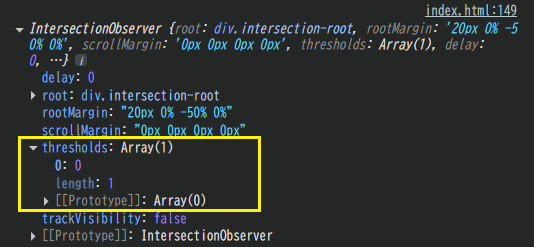
上は、IntersectionObserverをインスタンス生成の後にconsole.log()したスクリーンショットです。
thresholdには数値を1つしか設定していない場合でも、配列として扱われていることがわかります。
そして、thresholdに設定した値の割合分だけ、監視対象が交差範囲に入ったタイミングで、
コールバック関数が呼び出される仕様でしたね。
この2つの仕様を組み合わせると、[0, 0.25, 0.5, 0.75, 1]のように、
配列で0~1の範囲の値を設定し、それぞれのタイミングで各監視対象に対して何度もコールバック関数を呼び出すことができます。
コールバック関数の中で利用するものには、
isIntersecting, target, そしてintersectionRatioがありましたね。
ここで活躍を見せるのが、intersectionRatioです。
intersectionRatioを利用する
intersectionRatioは、0〜1 の数値で、
「監視対象が、どれくらい交差範囲に見えているか」を表します。
intersectionRatioは、thresholdに指定した 0〜1 の値と同じスケールで扱われます。
スクロール量との違いは以下のように覚えておくとよいでしょう。
スクロール量 → ページがどれだけ動いたか
intersectionRatio → 監視対象の交差している割合
つまり、「どれくらい見えたら、どんな状態にするか」という段階的な表現を作りたいときに、
threshold(配列)+ intersectionRatioが活躍します。
rootに要素を指定する
基礎編の使用例では、オプションのrootにはnullを指定していました。
nullを指定すると、ビューポートが監視範囲になります。
ビューポート全体ではなく、スクロール可能なコンテナの中で判定したい場合は、
そのコンテナ要素を root に指定します。
横スクロールでも使える
実は、というほどでもありませんが、IntersectionObserverは横スクロールでも使えます。
縦スクロールと同じ考え方で、rootにスライダーのコンテナを指定し、rootMarginの左右の値で判定範囲を調整することができます。
応用編の基本デモ
配列threshold・IntersectionRatio利用の基礎デモになります。
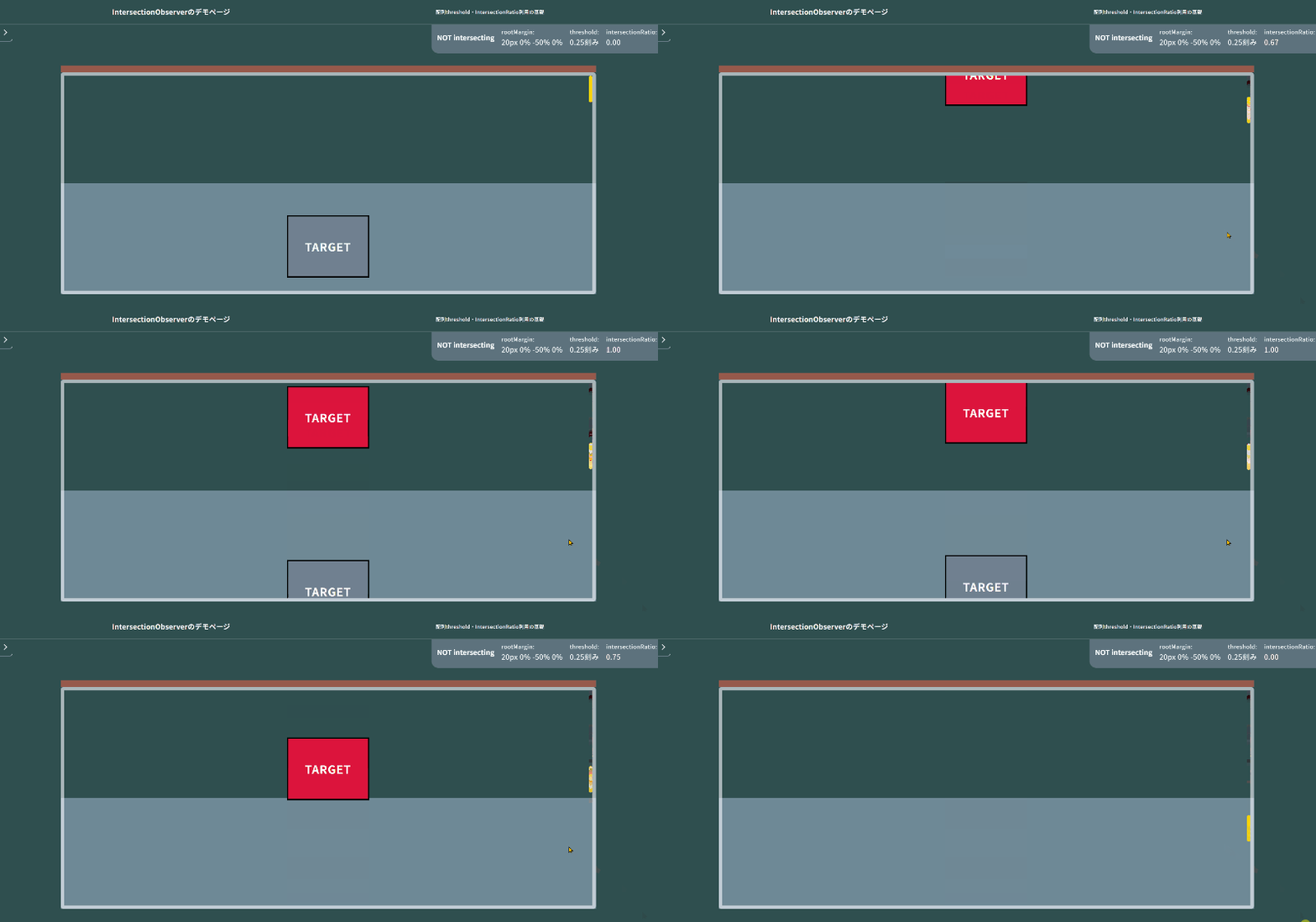
”配列threshold・IntersectionRatio利用の基礎”のデモページ
1 2 3 4 5 6 7 8 9 10 11 12 13 14 15 16 17 18 19 20 21 22 23 24 25 26 27 28 29 30 31 32 33 34 35 36 37 38 39 40 41 42 43 44 45 46 47 48 49 50 51 52 53 54 55 | const th_step = 0.25; // threshold用の配列をつくる関数。 // 引数が無い場合は0.01刻みで生成。 function buildThresholdList(step = 0.01) { const t = []; for (let v = 0; v <= 1; v += step) t.push(parseFloat(v.toFixed(4))); // 端数誤差で 1 を取りこぼさないように最後に 1 を必ず入れる if (t[t.length - 1] !== 1) t.push(1); return t; } // オプション設定 const option = { root: document.querySelector('.intersection_observer .intersection-root'), rootMargin: "20px 0% -50% 0%", threshold: buildThresholdList(th_step), } // インスタンス生成 // コールバック関数とオプションを渡します const observer = new IntersectionObserver(doWhenIntersect, option); // コンソールでobserverの中身を見てみる console.log(observer); // 監視対象にしたい要素を渡す document.querySelectorAll('.target-block').forEach((el) => { observer.observe(el); }); // コールバック関数 function doWhenIntersect(entries) { // コンソールでentriesの中身を見てみる console.log(entries); // forEachで各監視対象の処理をします entries.forEach(entry => { // 要素が交差したら… if (entry.isIntersecting) { // クラスをつける entry.target.classList.add('is-intersecting'); } else { // クラスを外す entry.target.classList.remove('is-intersecting'); } }); } |
1 2 3 4 5 6 7 8 9 10 11 12 13 14 15 16 17 18 19 20 21 22 23 24 25 26 27 28 29 30 31 32 33 34 35 36 37 38 39 40 41 42 43 44 45 46 47 48 49 50 51 52 53 54 55 56 57 58 59 60 61 | (function ($) { 'use strict'; const th_step = 0.25; // threshold用の配列をつくる関数。 // 引数が無い場合は0.01刻みで生成。 function buildThresholdList(step = 0.01) { const t = []; for (let v = 0; v <= 1; v += step) t.push(parseFloat(v.toFixed(4))); // 端数誤差で 1 を取りこぼさないように最後に 1 を必ず入れる if (t[t.length - 1] !== 1) t.push(1); return t; } // オプション設定 const option = { root: $('.intersection_observer .intersection-root')[0], rootMargin: "20px 0% -50% 0%", threshold: buildThresholdList(th_step), } // インスタンス生成 // コールバック関数とオプションを渡します const observer = new IntersectionObserver(doWhenIntersect, option); // コンソールでobserverの中身を見てみる console.log(observer); // 監視対象にしたい要素を渡す $('.target-block').each(function () { observer.observe(this); }); // コールバック関数 function doWhenIntersect(entries) { // コンソールでentriesの中身を見てみる console.log(entries); // forEachで各監視対象の処理をします entries.forEach(entry => { // 要素が交差したら… if (entry.isIntersecting) { // クラスをつける $(entry.target).addClass('is-intersecting'); } else { // クラスを外す $(entry.target).removeClass('is-intersecting'); } }); } })(jQuery); |
使用例
ここからは、応用的なオプションを活かした使用例を紹介していきます。
実務で使えそうなものから、「こんなこともできるんだ」というものまで、デモページと合わせてご覧ください。
ページトップボタン
ページトップボタンは、実務でもよく登場するUIです。「MVを過ぎたら表示する」「フッターに重ならないよう止める」という2つの判定を、IntersectionObserverで実装します。
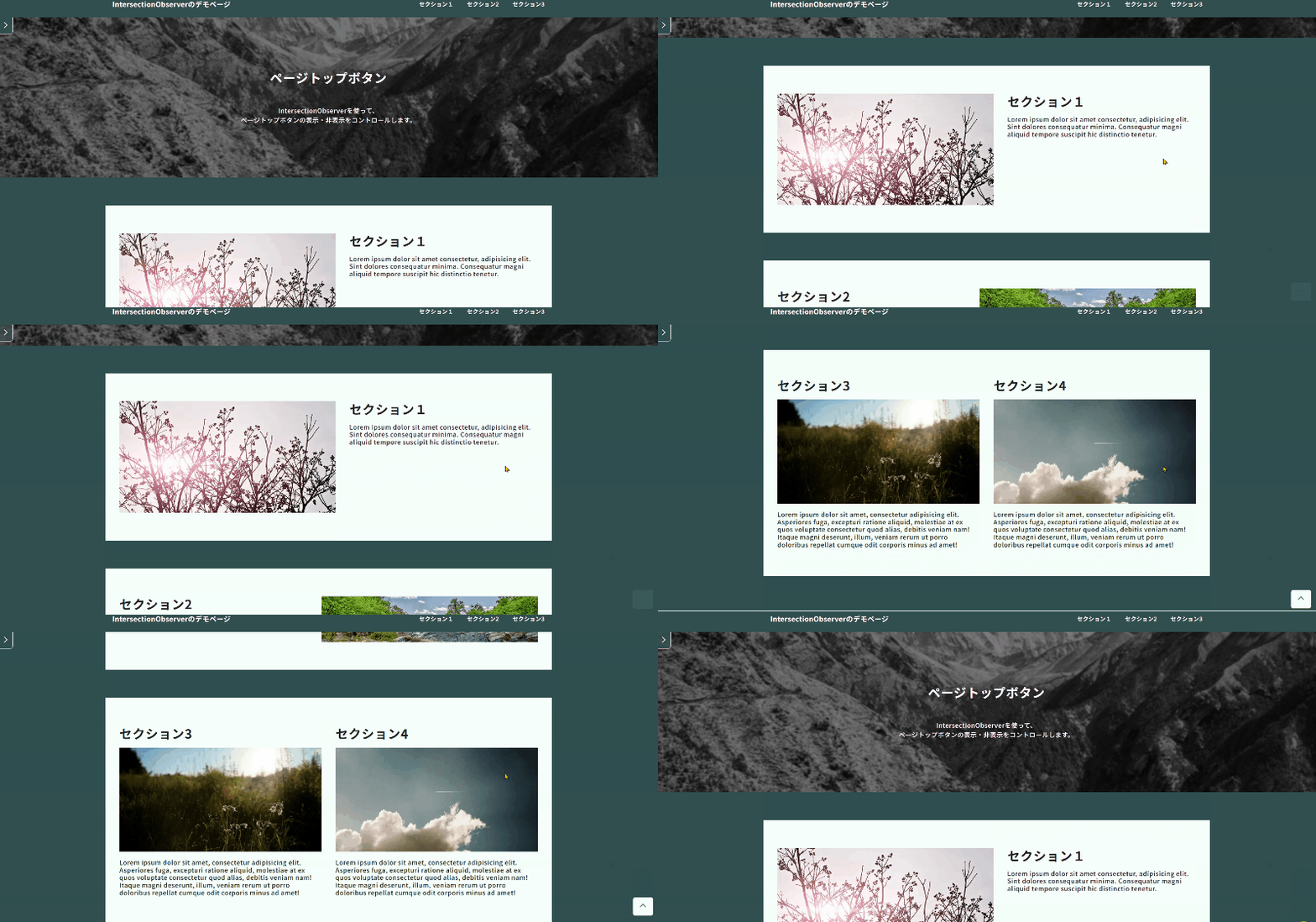
ここでやっていること
- 監視対象①:
MVセクション(表示タイミングの判定用) - 監視対象②:
フッター(ボタンの位置切り替え用) - 判定条件①:
MVセクションが画面内にあるかどうか(threshold: 0.3) - 判定条件②:
フッターが画面内に入ったかどうか(threshold: 0) - MVが画面内にある間:
ページトップボタンは非表示 - MVが画面外に出たら:
ページトップボタンを表示(is-shownを付与) - フッターが画面内に入ったら:
ボタンの position をfixedからabsoluteに切り替え、
フッターに被らない位置で止める - ResizeObserver:
フッターの高さ変化を検知し、ボタンの停止位置を再計算する
1 2 3 4 5 6 7 8 9 10 11 12 13 14 15 16 17 18 19 20 21 22 23 24 25 26 27 28 29 30 31 32 33 34 35 36 37 38 39 40 41 42 43 44 45 46 47 48 49 50 51 52 53 54 55 56 57 58 59 60 61 62 63 64 65 66 67 68 69 70 71 72 73 74 75 76 77 78 79 | const pageTop = document.getElementById('io-pagetop'); const footer = document.querySelector('.io-footer'); const mvSection = document.querySelector('.mv-section'); // 表示フラグを定義する let footHeight = 0; let isShowCondition = false; let isInsideFooter = false; // ページトップボタンの表示・位置を更新する関数 const updateUI = () => { // 1. 表示・非表示をクラスのつけ外しで変える if (isShowCondition) { pageTop.classList.add('is-shown'); } else { pageTop.classList.remove('is-shown'); } // 2. 位置 画面右下か、フッター上に固定するか if (isInsideFooter) { pageTop.style.position = 'absolute'; pageTop.style.bottom = `${footHeight + 20}px`; } else { pageTop.style.position = 'fixed'; pageTop.style.bottom = '20px'; } }; // ページトップボタンの実装で必要なのが、リサイズ処理 // 今回はリサイズイベントではなく // ResizeObserverでフッターのサイズの変化を監視 const ro = new ResizeObserver(entries => { entries.forEach(entry => { // footerのborderやpaddingを含んだ高さを取得し // 高さを比較 const currentHeight = entry.target.offsetHeight; if (currentHeight != footHeight) { footHeight = currentHeight; updateUI(); } }); }); ro.observe(footer); // ■ ポイント // オプション設定のthreshold(しきい値)をMVとフッターで変えたいため // 2つのIntersectionObserverを作ります。 // どちらのthresholdも同じ値であればこの必要はありません。 // 【IntersectionObserver】表示タイミング(MV)の監視 const mvObserver = new IntersectionObserver(entries => { entries.forEach(entry => { // MVが画面外に出たら表示フラグをtrueに isShowCondition = !entry.isIntersecting; updateUI(); }); }, { threshold: 0.3 }); // MVを監視対象に mvObserver.observe(mvSection); // 【IntersectionObserver】位置(フッター)の監視 const footerObserver = new IntersectionObserver(entries => { entries.forEach(entry => { // フッターが画面内に入ったらフラグをtrueに isInsideFooter = entry.isIntersecting; updateUI(); }); }, { threshold: 0 }); // フッターを監視対象に footerObserver.observe(footer); |
1 2 3 4 5 6 7 8 9 10 11 12 13 14 15 16 17 18 19 20 21 22 23 24 25 26 27 28 29 30 31 32 33 34 35 36 37 38 39 40 41 42 43 44 45 46 47 48 49 50 51 52 53 54 55 56 57 58 59 60 61 62 63 64 65 66 67 68 69 70 71 72 73 74 75 76 77 78 79 80 81 82 83 84 85 86 87 88 | (function ($) { 'use strict'; const $pageTop = $('#io-pagetop'); const $footer = $('.io-footer'); const $mvSection = $('.mv-section'); // 表示フラグを定義する let footHeight = 0; let isShowCondition = false; let isInsideFooter = false; // ページトップボタンの表示・位置を更新する関数 const updateUI = () => { // 1. 表示・非表示をクラスのつけ外しで変える if (isShowCondition) { $pageTop.addClass('is-shown'); } else { $pageTop.removeClass('is-shown'); } // 2. 位置 画面右下か、フッター上に固定するか if (isInsideFooter) { $pageTop.css({ position: 'absolute', bottom: `${footHeight + 20}px` }); } else { $pageTop.css({ position: 'fixed', bottom: '20px' }); } }; // ページトップボタンの実装で必要なのが、リサイズ処理 // 今回はリサイズイベントではなく // ResizeObserverでフッターのサイズの変化を監視 const ro = new ResizeObserver(entries => { entries.forEach(entry => { // footerのborderやpaddingを含んだ高さを取得し // 高さを比較 const currentHeight = entry.target.offsetHeight; if (currentHeight != footHeight) { footHeight = currentHeight; updateUI(); } }); }); ro.observe($footer[0]); // ■ ポイント // オプション設定のthreshold(しきい値)をMVとフッターで変えたいため // 2つのIntersectionObserverを作ります。 // どちらのthresholdも同じ値であればこの必要はありません。 // 【IntersectionObserver】表示タイミング(MV)の監視 const mvObserver = new IntersectionObserver(entries => { entries.forEach(entry => { // MVが画面外に出たら表示フラグをtrueに isShowCondition = !entry.isIntersecting; updateUI(); }); }, { threshold: 0.3 }); // MVを監視対象に mvObserver.observe($mvSection[0]); // 【IntersectionObserver】位置(フッター)の監視 const footerObserver = new IntersectionObserver(entries => { entries.forEach(entry => { // フッターが画面内に入ったらフラグをtrueに isInsideFooter = entry.isIntersecting; updateUI(); }); }, { threshold: 0 }); // フッターを監視対象に footerObserver.observe($footer[0]); })(jQuery); |
1 2 3 4 5 6 7 8 9 10 11 12 13 14 15 16 17 18 19 20 21 22 23 24 25 26 27 28 29 | <div id="wrapper"> <main class="intersection_observer demo"> <section class="mv-section section-each"> <div class="inner-block"> <div class="contents-wrap"> <h1 class="ttl">ページトップボタン</h1> <p class="txt">IntersectionObserverを使って、<br>ページトップボタンの表示・非表示をコントロールします。</p> </div> </div> <div class="img-area"><img src="https://picsum.photos/id/29/1920/600?grayscale&blur=2" alt=""></div> </section> </main> <footer class="io-footer" id="io-footer"> <a href="#wrapper" aria-label="ページ上部に戻る" class="io-pagetop" id="io-pagetop"> <span class="ico-arrow"></span> </a> <div class="inner-block"> <a href="https://b-risk.jp/blog/2026/2/intersectionobserver_advanced/" class="link">ブログに戻る</a> <small class="txt">© 2012-2026 BRISK</small> </div> </footer> </div> |
1 2 3 4 5 6 7 8 9 10 11 12 13 | /* ここはお好みで */ .io-pagetop { right: 0; z-index: 80; } .io-pagetop.is-shown { opacity: 1; } |
追従ボタンの切り替え
複数のセクションを監視し、画面内で最も多く見えているセクションに対応する追従ボタンを表示します。
intersectionRatioを使って「一番見えているセクション」を特定するのがポイントです。

ここでやっていること
- 監視対象:
各セクション(.js--section) - rootMargin:
上下を40%ずつ狭めた範囲を交差判定に使用 - intersectionRatioの記録:
各セクションのIDをキーにした連想配列(sections)に、交差中はintersectionRatioを、交差していない場合は0を格納 - アクティブセクションの特定:
sectionsの中でintersectionRatioが最大のセクションを「現在のセクション」と判断 - ボタンの切り替え:
現在のセクションのIDに対応するdata-section属性を持つボタンにのみis-currentを付与
1 2 3 4 5 6 7 8 9 10 11 12 13 14 15 16 17 18 19 20 21 22 23 24 25 26 27 28 29 30 31 32 33 34 35 36 37 38 39 40 41 42 43 44 45 46 47 48 49 50 51 52 53 54 55 56 57 58 59 60 61 62 63 64 65 66 67 68 69 70 71 72 73 74 75 76 77 78 79 | function buildThresholdList(step = 0.01) { const t = []; for (let v = 0; v <= 1; v += step) t.push(parseFloat(v.toFixed(4))); // 端数誤差で 1 を取りこぼさないように最後に 1 を必ず入れる if (t[t.length - 1] !== 1) t.push(1); return t; } const sections = {}; // オプション設定 const option = { root: null, // 交差範囲をマイナスマージンで狭める rootMargin: "-40% 0%", // しきい値を0.1ずつの配列に threshold: buildThresholdList(0.1), } // インスタンス生成 // コールバック関数とオプションを渡します const observer = new IntersectionObserver(doWhenIntersect, option); // 監視対象にしたい要素を渡す document.querySelectorAll('.js--section').forEach((el) => { observer.observe(el); // 配列にidをキーとして0を入れる // section-1: 0 sections[el.id] = 0; }); function doWhenIntersect(entries) { entries.forEach(entry => { // 監視対象のid取得 const id = entry.target.id; if (!id) return; // 対象が交差している場合は対象のintersectionRatioを、 // そうでない場合は0を sections[id] = entry.isIntersecting ? entry.intersectionRatio : 0; }); // 別の関数にてボタンのクラスの付け替えを行う updateCurrentBtn(); } function updateCurrentBtn() { let currentSectionId = ''; let maxRatio = 0; // 一番 ratio が大きい section を探す Object.entries(sections).forEach(([sectionId, ratio]) => { if (ratio > maxRatio) { maxRatio = ratio; currentSectionId = sectionId; } }); // 一旦すべてのボタンからクラスを外す document.querySelectorAll('.float-btn').forEach((btn) => { btn.classList.remove('is-current'); }); // idに対応するボタンだけ付ける if (currentSectionId) { const targetBtn = document.querySelector( '.float-btn[data-section="' + currentSectionId + '"]' ); if (targetBtn) { targetBtn.classList.add('is-current'); } } } |
1 2 3 4 5 6 7 8 9 10 11 12 13 14 15 16 17 18 19 20 21 22 23 24 25 26 27 28 29 30 31 32 33 34 35 36 37 38 39 40 41 42 43 44 45 46 47 48 49 50 51 52 53 54 55 56 57 58 59 60 61 62 63 64 65 66 67 68 69 70 71 72 73 74 75 76 77 78 79 80 81 | (function ($) { 'use strict'; function buildThresholdList(step = 0.01) { const t = []; for (let v = 0; v <= 1; v += step) t.push(parseFloat(v.toFixed(4))); // 端数誤差で 1 を取りこぼさないように最後に 1 を必ず入れる if (t[t.length - 1] !== 1) t.push(1); return t; } const sections = {}; // オプション設定 const option = { root: null, // 交差範囲をマイナスマージンで狭める rootMargin: "-40% 0%", // しきい値を0.1ずつの配列に threshold: buildThresholdList(0.1), } // インスタンス生成 // コールバック関数とオプションを渡します const observer = new IntersectionObserver(doWhenIntersect, option); // 監視対象にしたい要素を渡す $('.js--section').each(function () { observer.observe(this); // 配列にidをキーとして0を入れる // section-1: 0 sections[this.id] = 0; }); function doWhenIntersect(entries) { entries.forEach(entry => { // 監視対象のid取得 const id = entry.target.id; if (!id) return; // 対象が交差している場合は対象のintersectionRatioを、 // そうでない場合は0を sections[id] = entry.isIntersecting ? entry.intersectionRatio : 0; }); // 別の関数にてボタンのクラスの付け替えを行う updateCurrentBtn(); } function updateCurrentBtn() { let currentSectionId = ''; let maxRatio = 0; // 一番 ratio が大きい section を探す Object.entries(sections).forEach(([sectionId, ratio]) => { if (ratio > maxRatio) { maxRatio = ratio; currentSectionId = sectionId; } }); // 一旦すべてのボタンからクラスを外す $('.float-btn').removeClass('is-current'); // idに対応するボタンだけ付ける if (currentSectionId) { const $targetBtn = $('.float-btn[data-section="' + currentSectionId + '"]'); if ($targetBtn.length) { $targetBtn.addClass('is-current'); } } } })(jQuery); |
1 2 3 4 5 6 7 8 9 10 11 | <div class="float-btn-area"> <div class="float-btn-wrap"> <a data-section="section-1" href="#section-1" class="float-btn"><span class="inn-txt">セクション1のボタン</span></a> <a data-section="section-2" href="#section-2" class="float-btn red"><span class="inn-txt">セクション2のボタン</span></a> <a data-section="section-3" href="#section-3" class="float-btn blue"><span class="inn-txt">セクション3のボタン</span></a> </div> </div> |
1 2 3 4 5 6 7 8 9 10 11 12 13 14 15 16 17 18 19 20 21 22 23 24 25 26 27 28 29 30 31 32 33 34 35 36 37 38 39 40 41 42 43 44 45 46 47 48 49 50 51 52 53 54 55 56 57 58 59 60 61 62 63 64 65 66 67 | /* ここはお好みで */ .intersection_observer.demo-float-btn .float-btn-area { position: fixed; top: 0; bottom: 0; right: 0; margin: auto; z-index: 100; display: flex; justify-content: center; align-items: center; } .intersection_observer.demo-float-btn .float-btn-area .float-btn-wrap { display: flex; flex-direction: column; width: fit-content; height: fit-content; } .intersection_observer.demo-float-btn .float-btn-area .float-btn { background: Gold; border: 1px solid mintcream; border-radius: 8px 0 0 8px; text-orientation: upright; writing-mode: vertical-rl; white-space: nowrap; padding: 1em 0.75em; font-size: 1.25em; letter-spacing: 0.05em; width: fit-content; max-height: fit-content; transition: 0.3s ease-in-out; transition-property: opacity, background, height, padding-inline, margin-top; } .intersection_observer.demo-float-btn .float-btn-area .float-btn:not(.is-current) { opacity: 0; pointer-events: none; user-select: none; touch-action: none; height: 0; padding-inline: 0; } .intersection_observer.demo-float-btn .float-btn-area .float-btn:focus-visible { background: GoldenRod; } .intersection_observer.demo-float-btn .float-btn-area .float-btn.red { background: Tomato; } .intersection_observer.demo-float-btn .float-btn-area .float-btn.red:focus-visible { background: crimson; } .intersection_observer.demo-float-btn .float-btn-area .float-btn.blue { background: royalblue; } .intersection_observer.demo-float-btn .float-btn-area .float-btn.blue:focus-visible { background: rgb(28, 79, 230); } .intersection_observer.demo-float-btn .float-btn-area .float-btn.is-current { opacity: 1; pointer-events: initial; user-select: initial; touch-action: initial; height: 100%; } |
intersectionRatioでグラデ操作
監視対象が交差範囲に入る割合(intersectionRatio)をCSS変数に渡すことで、
スクロールに連動した背景グラデーションの変化を実現します。
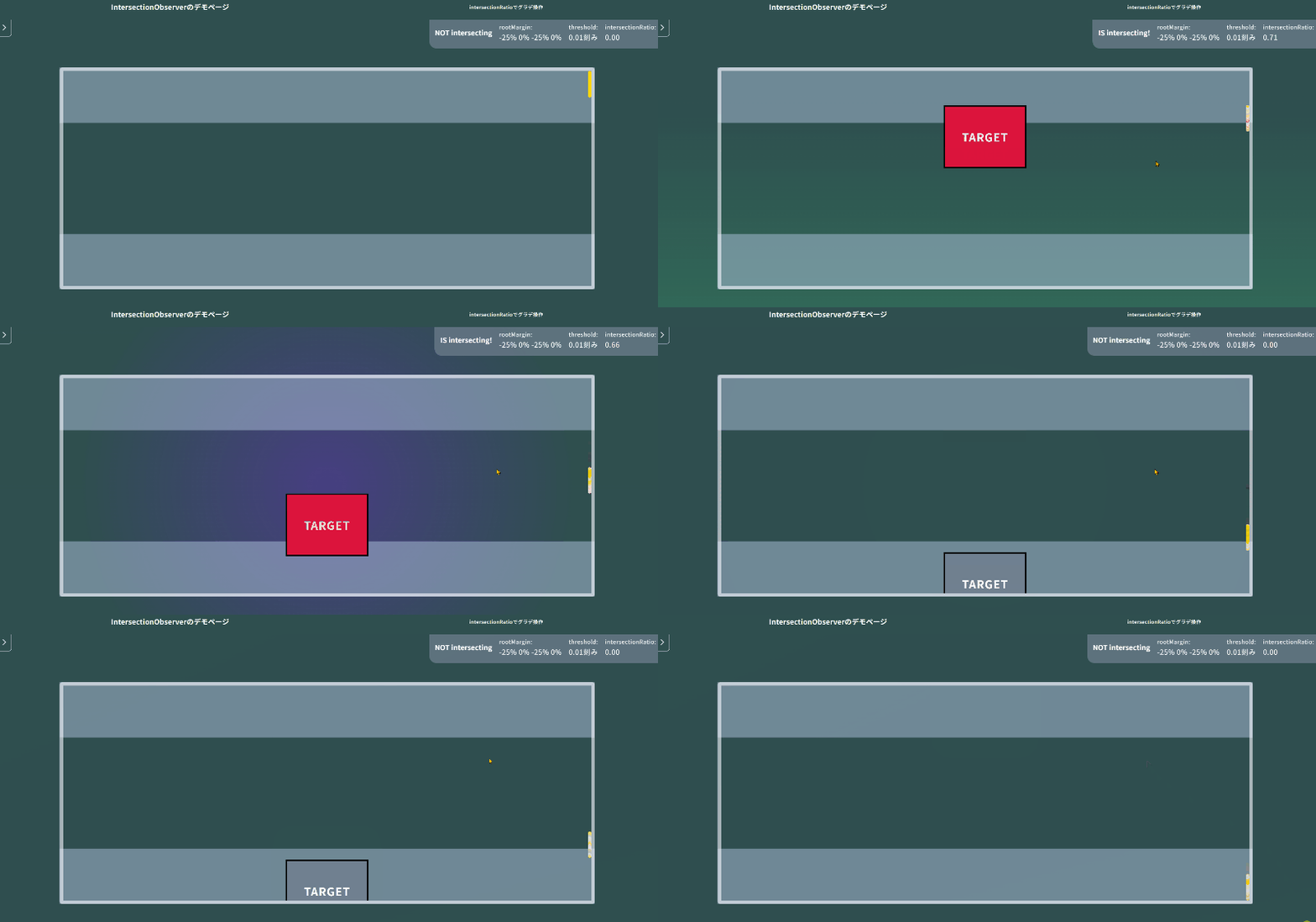
“intersectionRatioでグラデ操作”のデモページ
ここでやっていること
- 監視対象:
各ターゲットブロック(.target-block)。それぞれdata-target-block属性で識別 - threshold:
0.01刻みの配列を指定し、わずかな変化もコールバックで拾えるようにする - intersectionRatioをCSS変数に渡す:
取得したintersectionRatioを小数第一位で切り捨て、ターゲットごとに--intersection-ratio-bg-01のようなCSS変数としてセット - 背景の切り替え:
交差したターゲットのdata属性をもとにmainタグへbg-01などのクラスを付与。CSSでCSS変数を参照してグラデーションを変化させる
1 2 3 4 5 6 7 8 9 10 11 12 13 14 15 16 17 18 19 20 21 22 23 24 25 26 27 28 29 30 31 32 33 34 35 36 37 38 39 40 41 42 43 44 45 46 47 48 49 50 51 52 53 54 55 56 57 58 59 60 | let th_step = 0; function buildThresholdList(step = 0.01) { th_step = step; const t = []; for (let v = 0; v <= 1; v += step) t.push(parseFloat(v.toFixed(4))); // 端数誤差で 1 を取りこぼさないように最後に 1 を必ず入れる if (t[t.length - 1] !== 1) t.push(1); return t; } // オプション設定 const option = { root: document.querySelector('.intersection_observer .intersection-root'), // 交差範囲を縦に25%ずつ狭めてみる rootMargin: "-25% 0%", // しきい値を0.01刻みの配列にして渡す threshold: buildThresholdList(), } // インスタンス生成 // コールバック関数とオプションを渡します const observer = new IntersectionObserver(doWhenIntersect, option); // コンソールでobserverの中身を見てみる console.log(observer); // 監視対象にしたい要素を渡す document.querySelectorAll('.target-block').forEach((el) => { observer.observe(el); }); function doWhenIntersect(entries) { entries.forEach(entry => { // intersectionRatioを小数第二位で切り捨て // 第二位だとがくがくしてしまうときがある let ratio = (Math.floor(entry.intersectionRatio * 100)) / 100; // ターゲットのdata属性ごとにCSSプロパティを作成して // ターゲットごとのアニメーション制御 document.documentElement.style.setProperty('--intersection-ratio' + '-bg-' + entry.target.dataset.targetBlock, ratio); if (entry.isIntersecting) { entry.target.classList.add('is-intersecting'); // コンテンツを囲むmainタグにクラス付け // 監視対象につけたdata属性をクラスに利用 document.querySelector('.demo-ratio').classList.add('bg-' + entry.target.dataset.targetBlock); } else if (!entry.isIntersecting) { // ターゲットが交差範囲から外れたらクラスを外す entry.target.classList.remove('is-intersecting'); document.querySelector('.demo-ratio').classList.remove('bg-' + entry.target.dataset.targetBlock); } }); } |
1 2 3 4 5 6 7 8 9 10 11 12 13 14 15 16 17 18 19 20 21 22 23 24 25 26 27 28 29 30 31 32 33 34 35 36 37 38 39 40 41 42 43 44 45 46 47 48 49 50 51 52 53 54 55 56 57 58 59 60 61 62 63 64 65 66 67 68 69 | (function ($) { 'use strict'; let th_step = 0; function buildThresholdList(step = 0.01) { th_step = step; const t = []; for (let v = 0; v <= 1; v += step) t.push(parseFloat(v.toFixed(4))); // 端数誤差で 1 を取りこぼさないように最後に 1 を必ず入れる if (t[t.length - 1] !== 1) t.push(1); return t; } // オプション設定 const option = { root: $('.intersection_observer .intersection-root')[0], // 交差範囲を縦に25%ずつ狭めてみる rootMargin: "-25% 0%", // しきい値を0.01刻みの配列にして渡す threshold: buildThresholdList(), } // インスタンス生成 // コールバック関数とオプションを渡します const observer = new IntersectionObserver(doWhenIntersect, option); // コンソールでobserverの中身を見てみる console.log(observer); // 監視対象にしたい要素を渡す $('.target-block').each(function () { observer.observe(this); }); function doWhenIntersect(entries) { entries.forEach(entry => { // intersectionRatioを小数第二位で切り捨て // 第二位だとがくがくしてしまうときがある let ratio = (Math.floor(entry.intersectionRatio * 100)) / 100; // ターゲットのdata属性ごとにCSSプロパティを作成して // ターゲットごとのアニメーション制御 document.documentElement.style.setProperty( '--intersection-ratio' + '-bg-' + entry.target.dataset.targetBlock, ratio ); if (entry.isIntersecting) { $(entry.target).addClass('is-intersecting'); // コンテンツを囲むmainタグにクラス付け // 監視対象につけたdata属性をクラスに利用 $('.demo-ratio').addClass('bg-' + entry.target.dataset.targetBlock); } else if (!entry.isIntersecting) { // ターゲットが交差範囲から外れたらクラスを外す $(entry.target).removeClass('is-intersecting'); $('.demo-ratio').removeClass('bg-' + entry.target.dataset.targetBlock); } }); } })(jQuery); |
1 2 3 4 5 6 7 8 9 10 11 12 13 14 15 16 17 | <div class="intersection-root"> <!-- rootに指定したコンテナ --> <div class="target-container"> <div class="target-block" data-target-block="01"> <!-- 監視対象 --> TARGET </div> <div class="target-block" data-target-block="02"> <!-- 監視対象 --> TARGET </div> <div class="target-block" data-target-block="03"> <!-- 監視対象 --> TARGET </div> </div> </div> |
1 2 3 4 5 6 7 8 9 10 11 12 13 14 15 16 17 18 19 20 21 | /* ここはお好みで */ .intersection_observer.demo-ratio.bg-01 { background: linear-gradient(0deg, rgba(60, 250, 139, 0.7) calc(var(--intersection-ratio-bg-01, 0) * 100% - 300%), darkslategray calc(var(--intersection-ratio-bg-01, 0) * 100% + 0%)); } .intersection_observer.demo-ratio.bg-02 { background: radial-gradient(circle, rgba(95, 46, 180, 0.5) 0%, darkslategray calc(var(--intersection-ratio-bg-02, 0) * 100% - 30%)); background-size: 200%; background-position: center; } .intersection_observer.demo-ratio.bg-03 { background: linear-gradient(345deg, rgb(215, 1, 1) calc(var(--intersection-ratio-bg-03, 0) * 100% - 300%), rgba(47, 79, 79, 0) calc(var(--intersection-ratio-bg-03, 0) * 100% + 0%)), linear-gradient(155deg, rgb(8, 1, 215) calc(var(--intersection-ratio-bg-03, 0) * 100% - 300%), rgba(47, 79, 79, 0) calc(var(--intersection-ratio-bg-03, 0) * 100% + 0%)); } .intersection_observer.demo-ratio.bg-03 .target-block { opacity: var(--intersection-ratio-bg-03); transform: scale(calc(1 + var(--intersection-ratio-bg-03) * 0.1)); filter: blur(calc((1 - var(--intersection-ratio-bg-03)) * 20px)); } |
スライダーと組み合わせる
自動で横スクロールするスライダーに IntersectionObserver を組み合わせ、
スライダー内で見えているスライドに応じて背景を切り替えます。
root にスライダーのコンテナを指定することで、横スクロール内の交差判定が可能になります。
ここでやっていること
- 監視対象:
各スライド(.swiper-slide)。ループ時に生成されるクローン要素(.swiper-slide-duplicate)は除外 - root:
スライダーのコンテナ(.horizontal-slider.swiper)を指定。ビューポートではなくスライダー内を監視範囲にする - rootMargin:
左右に50%ずつ広げることで、スライダーの端に近づいた段階から交差を検知 - intersectionRatioをCSS変数に渡す:
スライドのdata属性をキーに--intersection-ratio-01のようなCSS変数をセット。CSSで背景アニメーションに利用 - 背景の切り替え:
交差したスライドのdata属性に対応する.bg-01などの要素にis-activeを付与して背景を表示
1 2 3 4 5 6 7 8 9 10 11 12 13 14 15 16 17 18 19 20 21 22 23 24 25 26 27 28 29 30 31 32 33 34 35 36 37 38 39 40 41 42 43 44 45 46 47 48 49 50 51 52 53 54 55 56 57 58 59 60 61 | const swiper = new Swiper('.horizontal-slider.swiper', { slidesPerView: 'auto', loop: true, speed: 8000, autoplay: { delay: 0, disableOnInteraction: false, }, freeMode: true, allowTouchMove: false, }); function buildThresholdList(step = 0.01) { const t = []; for (let v = 0; v <= 1; v += step) t.push(parseFloat(v.toFixed(4))); // 端数誤差で 1 を取りこぼさないように最後に 1 を必ず入れる if (t[t.length - 1] !== 1) t.push(1); return t; } // オプション設定 const option = { root: document.querySelector('.horizontal-slider.swiper'), // 交差範囲を左右に50%ずつ広げる // ここはお好みで値を変えてOK rootMargin: "0% 50%", threshold: buildThresholdList(), } // インスタンス生成 // コールバック関数とオプションを渡します const observer = new IntersectionObserver(doWhenIntersect, option); // 監視対象にしたい要素を渡す // 安全のため、クローンスライダーは除外 document.querySelectorAll('.swiper-slide:not(.swiper-slide-duplicate)').forEach((el) => { observer.observe(el); }); function doWhenIntersect(entries) { entries.forEach(entry => { const key = entry.target.dataset.slide; if (!key) return; const targetBg = document.querySelector('.bg-container .bg-' + key); if (!targetBg) return; let ratio = (Math.floor(entry.intersectionRatio * 100)) / 100; document.documentElement.style.setProperty('--intersection-ratio-' + key, ratio); if (entry.isIntersecting) { targetBg.classList.add('is-active'); } else { targetBg.classList.remove('is-active'); } }); } |
1 2 3 4 5 6 7 8 9 10 11 12 13 14 15 16 17 18 19 20 21 22 23 24 25 26 27 28 29 30 31 32 33 34 35 36 37 38 39 40 41 42 43 44 45 46 47 48 49 50 51 52 53 54 55 56 57 58 59 60 61 62 63 64 65 66 67 68 | (function ($) { 'use strict'; const swiper = new Swiper('.horizontal-slider.swiper', { slidesPerView: 'auto', loop: true, speed: 8000, autoplay: { delay: 0, disableOnInteraction: false, }, freeMode: true, allowTouchMove: false, }); function buildThresholdList(step = 0.01) { const t = []; for (let v = 0; v <= 1; v += step) t.push(parseFloat(v.toFixed(4))); // 端数誤差で 1 を取りこぼさないように最後に 1 を必ず入れる if (t[t.length - 1] !== 1) t.push(1); return t; } // オプション設定 const option = { root: $('.horizontal-slider.swiper')[0], // 交差範囲を左右に50%ずつ広げる // ここはお好みで値を変えてOK rootMargin: "0% 50%", threshold: buildThresholdList(), } // インスタンス生成 // コールバック関数とオプションを渡します const observer = new IntersectionObserver(doWhenIntersect, option); // 監視対象にしたい要素を渡す // 安全のため、クローンスライダーは除外 $('.swiper-slide').not('.swiper-slide-duplicate').each(function () { observer.observe(this); }); function doWhenIntersect(entries) { entries.forEach(entry => { const key = $(entry.target).data('slide'); if (!key) return; const $targetBg = $('.bg-container .bg-' + key); if (!$targetBg.length) return; let ratio = (Math.floor(entry.intersectionRatio * 100)) / 100; document.documentElement.style.setProperty('--intersection-ratio-' + key, ratio); if (entry.isIntersecting) { $targetBg.addClass('is-active'); } else { $targetBg.removeClass('is-active'); } }); } })(jQuery); |
1 2 3 4 5 6 7 8 9 10 11 12 13 14 15 16 17 18 19 20 21 22 | <div class="horizontal-container"> <div class="swiper horizontal-slider"> <div class="swiper-wrapper"> <div class="swiper-slide" data-slide="01"> <img src="https://picsum.photos/id/36/4179/2790" alt=""> </div> <div class="swiper-slide" data-slide="02"> <img src="https://picsum.photos/id/62/2000/1333" alt=""> </div> <div class="swiper-slide" data-slide="03"> <img src="https://picsum.photos/id/107/5000/3333" alt=""> </div> <div class="swiper-slide" data-slide="04"> <img src="https://picsum.photos/id/147/2448/2448" alt=""> </div> </div> </div> </div> |
1 2 3 4 5 6 7 8 9 10 11 12 13 14 15 16 17 18 19 20 21 22 23 24 25 26 27 28 29 30 31 32 33 34 35 36 37 38 39 40 41 42 43 44 45 46 47 48 49 50 51 52 53 54 55 56 57 58 59 60 61 62 63 64 65 66 67 68 69 70 71 72 73 74 75 76 77 | /* ここはお好みで */ .intersection_observer.demo-horizontal .bg-container { position: absolute; z-index: 1; inset: 0; margin: auto; width: 100%; height: 100%; } .intersection_observer.demo-horizontal .bg-container > * { width: 100%; height: 100%; position: absolute; inset: 0; margin: auto; opacity: 0; transition: opacity 0.3s ease-in-out; pointer-events: none; filter: contrast(0.7); } .intersection_observer.demo-horizontal .bg-container > *.is-active { opacity: 1; } .intersection_observer.demo-horizontal .bg-container .bg-01 { background: linear-gradient(155deg, rgb(15, 215, 1) calc(var(--intersection-ratio-01, 0) * 100% - 200%), rgba(47, 79, 79, 0) calc(var(--intersection-ratio-01, 0) * 100% + 0%)); } .intersection_observer.demo-horizontal .bg-container .bg-02 { background: linear-gradient(200deg, rgb(222, 74, 15) calc(var(--intersection-ratio-02, 0) * 100% - 120%), rgba(47, 79, 79, 0) calc(var(--intersection-ratio-02, 0) * 100% + 0%)); } .intersection_observer.demo-horizontal .bg-container .bg-03 { background: linear-gradient(335deg, rgb(215, 211, 1) calc(var(--intersection-ratio-03, 0) * 100% - 120%), rgba(47, 79, 79, 0) calc(var(--intersection-ratio-03, 0) * 100% + 0%)); } .intersection_observer.demo-horizontal .bg-container .bg-04 { background: linear-gradient(25deg, rgb(1, 215, 197) calc(var(--intersection-ratio-04, 0) * 100% - 120%), rgba(47, 79, 79, 0) calc(var(--intersection-ratio-04, 0) * 100% + 0%)); } .intersection_observer.demo-horizontal .horizontal-container { display: flex; justify-content: center; align-items: center; position: relative; z-index: 2; } .intersection_observer.demo-horizontal .horizontal-container::before { position: absolute; content: ""; width: calc(100% + 16px); height: calc(100% + 16px); border: 8px solid rgba(255, 255, 255, 0.2); filter: drop-shadow(2px 4px 6px black) contrast(0.9); border-radius: 16px; top: -8px; left: -8px; margin: auto; } .intersection_observer.demo-horizontal .horizontal-container .swiper { height: 400px; max-width: 700px; overflow: hidden; border-radius: 8px; } .intersection_observer.demo-horizontal .horizontal-container .swiper .swiper-wrapper { transition-timing-function: linear !important; } .intersection_observer.demo-horizontal .horizontal-container .swiper-slide { width: 100% !important; height: 100%; } .intersection_observer.demo-horizontal .horizontal-container .swiper-slide img { width: 100%; height: 100%; object-fit: cover; filter: opacity(0.9) contrast(0.9); } |
まとめ
応用編では、実用的なUI制御から演出系の表現まで、
さまざまな活用例を探ってみました。
IntersectionObserverは、このほかにもアイデア次第でたくさんのことに応用できます。
「こんなことにも使えるんだ」という発見が少しでもあれば嬉しいです。
ぜひ自分なりの使い道を見つけて、制作に取り入れてみてください。